
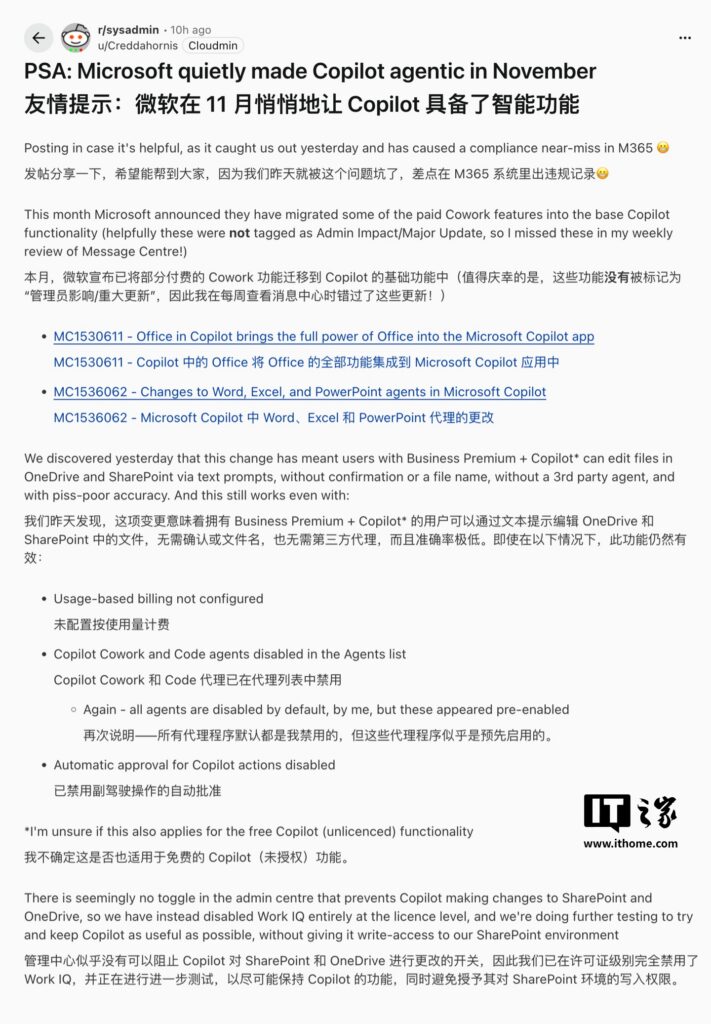
An IT administrator testing Microsoft 365 Business Premium with a Copilot license said Copilot could select and edit a file in OneDrive or SharePoint in response to a text prompt. The user did not have to name the file or confirm the edit, according to Neowin’s November 27, 2026 report.
The administrator said the edits still went through with pay-as-you-go billing off, the Copilot Cowork and Code agents disabled, and automatic approval for Copilot actions turned off. Some changes appeared inaccurate. That raised a compliance concern for the administrator: a user might not realize that Copilot had changed an important business document, let alone notice an error in the edit.
The administrator could not find a setting in the Microsoft 365 admin center that specifically blocked Copilot from writing to OneDrive and SharePoint files. Instead, the administrator disabled Work IQ at the license level while looking for a narrower option that would preserve other Copilot features.
Microsoft had announced the editing changes in two Message Center notices. MC1530611 described creating and editing Word, Excel and PowerPoint files directly in Copilot. MC1536062 described bringing previously separate Office agents into that editing experience. Microsoft said existing Copilot configurations and policies still apply, advised administrators to review them, and said file access permissions and retention policies remain unchanged.
File access and edit confirmation are separate questions. The administrator did not report that Copilot bypassed file permissions; the concern was whether users would know which file it had selected and what it had changed. Before enabling the feature for sensitive documents, administrators can test those two behaviors with non-sensitive files under their organization’s existing settings.